


StarMaker: Sing Karaoke Songs
4.338.95K Reviews
App Specs
- Version
- 9.15.7
- Updated On
- License
- Free
- Downloads
- 500,000,000+
- Developer
- SKYWORK AI PTE. LTD.
- Categories
- Music & Audio
- Platform
- Android, iOS
Screenshots
 Analysis by AppCompare
Before I settle into the karaoke features, I’d ask myself what I want from a singing app: a quick way to practice, a polished recording to share, or a social place to hear other singers. Those goals overlap, but they are not the same. StarMaker: Sing Karaoke Songs tries to cover all three, which makes it more appealing to people who enjoy singing with an audience than to someone who only wants a private practice tool.
That distinction is useful when choosing between karaoke apps, voice-recording tools, and music-streaming services. A karaoke app centers the lyrics and the act of singing along; a dedicated audio editor usually gives more control over recording but less of a ready-made community; a streaming service is better for listening than for creating a performance. I see this app as strongest when I want the song, recording tools, and sharing experience gathered in one place.
Choose it for participation, not just playback
The main decision is whether you want to sing and be part of a music-focused social space. If you tend to record a verse, listen back, and try again, the combination of on-screen lyrics and vocal effects gives you an approachable place to experiment. If your goal is simply to play songs in the background, this is the wrong kind of app: its appeal is in taking part rather than treating music as passive listening.
Guides and Analysis on StarMaker: Sing Karaoke Songs
I would also think about how comfortable I am sharing performances. The social side can make practice feel less solitary, and duets offer a reason to return to a song with someone else’s contribution. But if I prefer to keep every recording private, or I find public feedback distracting, I would look for a more personal recording workflow instead. The best fit depends less on how often I sing and more on whether I enjoy showing what I make.
A practical first session
For a first try, I would pick a familiar song rather than the most difficult one I know. That lets me concentrate on how the lyrics move with the music, where the recording controls appear, and whether the vocal effects suit my voice. I would record a short section, listen back, and adjust one thing at a time. Adding several effects at once can make it harder to tell whether a change actually helped.
A useful everyday scenario is singing at home after work, when I have a few minutes but do not want to set up a separate recording project. I can choose a song, follow the words, and make a quick take. If it sounds fun, I can share it or try a duet; if not, I can treat it as practice. That low-commitment loop is a better reason to install the app than expecting every recording to sound studio-ready.
Think about your setup and expectations
Recording quality is affected by more than an effect slider. A quiet room, a steady phone position, and a little distance from the microphone can help keep a take listenable. I would avoid holding the phone right against my mouth, because breath and handling noise can distract from the singing. A simple test recording before a full song also helps me judge whether the room is echoing or other sounds are getting in.
Worth Reading Before You Choose

Flipboard Shows What News Apps Must Do Beyond the Feed

Switching to Android Auto Means Rethinking Your Driving Routine

Google Calendar Makes a Crowded Week Easier to Manage

Ludo King Makes the Most of the Minutes Between Plans

Baby Panda World Brings Quick Play to Modern Phones, but Its Game Library Feels Busy

ESPN’s Live Game View Makes Following Close Games Easier
There is a trade-off between quick polish and a natural vocal sound. Echo or reverb can make a performance feel fuller, but using too much can blur the words. Pitch correction may be useful as a confidence aid, yet it is not a substitute for practicing a tricky line; I would compare takes with the effect on and off so I know what is improving the performance. These small checks make the tools more useful without turning a casual sing-along into a technical chore.
What the social layer changes
Sharing and duetting make the experience more than a solo karaoke session. I can use other performances as inspiration, notice how different people approach the same song, and find a reason to revisit a track. That also means the app is better suited to someone who likes browsing user-made music than to someone who wants a quiet, isolated workspace. I would be selective about what I post and remember that a performance shared socially can invite reactions as well as encouragement.
Challenges can add a playful goal when I want a prompt beyond choosing a song myself. I would treat them as optional motivation, not as a measure of singing ability. The useful approach is to pick a challenge because the song interests me, not because I feel pressure to compete. That keeps the social features enjoyable even when I am only there to practice casually.
Where other kinds of apps make more sense
Compared with a basic karaoke player, the appeal here is the combination of recording, vocal adjustments, and community participation. A simpler player may be a better choice if I only need lyrics and backing music and do not want profiles, sharing, or extra creative options. A standalone audio editor may suit a singer who already has a recording workflow and wants more deliberate control over tracks. Neither alternative is automatically better; it depends on whether I value convenience and social discovery or a narrower, more focused tool.
It is also worth separating karaoke from learning to sing. Repeating songs can help me become more comfortable with timing and phrasing, but I would not rely on an entertainment app alone for structured vocal instruction. Someone looking for guided lessons, detailed technique feedback, or a disciplined practice plan may be better served by a teaching-focused option. I would use this app to make singing approachable and enjoyable, while seeking another resource for specific technical goals.
Consider the ongoing commitment
The app is free to start, though in-app purchases range from $0.49 to $199.99 per item, so I would check what is included before spending. I would first use the free experience long enough to decide whether I actually return to it and which features matter to me. If a paid option becomes tempting, I would compare its specific benefit with how often I sing rather than paying just because a feature looks exciting in the moment.
Moving from another karaoke app has a small but real cost: finding the songs I like again, learning where the recording controls are, and deciding whether I want to rebuild a social routine. I would not switch solely for a new interface. I would switch if the chance to duet, share performances, and try vocal effects would change how often I sing; if all I need is a private backing track, staying with a simpler setup is perfectly sensible.
Who is likely to enjoy it
It is a natural fit for casual singers who like experimenting, people who want to share performances with friends or a wider community, and anyone who finds lyrics and a backing track more inviting than practicing alone. It can also be a fun low-pressure way to try recording for the first time. I would be more cautious if I dislike social features, want advanced editing control, need a structured singing course, or expect every take to sound professionally produced.
For families, I would keep the Teen content rating in mind and make sharing choices thoughtfully, especially if younger people use the device. That does not take away from the fun, but it is a reminder that a social music app deserves the same care around audience and personal boundaries as other sharing platforms.
There is plenty of audience for this approach: SKYWORK AI PTE. LTD. develops the app, which has a 4.4 average from around 3.9 million ratings and over 500 million installs. It is free to download, with optional in-app purchases, and its current version is 9.1.7 for devices running Android 6.0 or later. Those figures suggest a widely used karaoke destination, though popularity alone cannot tell me whether its community or workflow will suit my habits.
Have you ever wanted to feel like a superstar, belting out your favorite tunes without leaving your living room? Well, that's exactly what StarMaker: Sing Karaoke Songs promises to deliver. I recently took a deep dive into this app, and let me tell you, it’s like having a karaoke bar in your pocket!
Getting Started with StarMaker
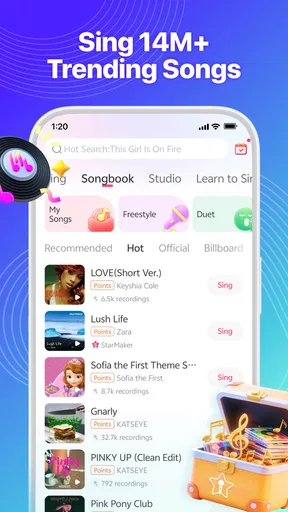
Jumping into the world of StarMaker is as easy as pie. After a quick download, you'll be greeted with a vibrant interface that's bursting with musical energy. It felt like stepping into a party where everyone is ready to sing their hearts out. The app offers a vast library of songs, from the latest chart-toppers to timeless classics. Whether you're into pop, rock, or even country, there's something for everyone.
Features That Hit the Right Note
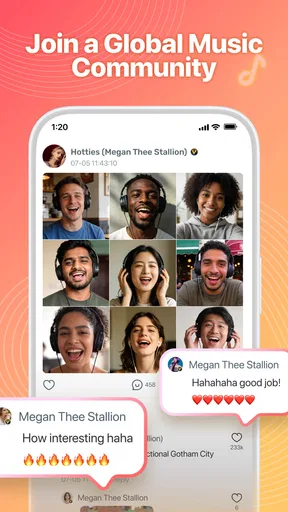
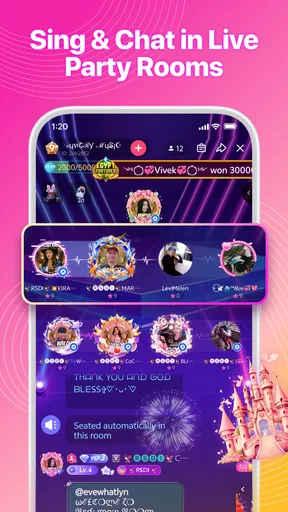
One of the standout features is the app's social aspect. You can join a community of music lovers where you can share your performances, duet with friends, and even compete in singing challenges. I found myself lost in a sea of creativity, listening to renditions from people all over the world. It’s like having a global karaoke night every day!
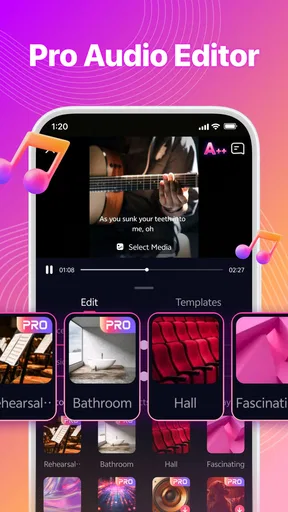
Another nifty feature is the audio effects. With a few taps, I could enhance my voice with echo and reverb, making me sound like I was performing in a concert hall. There’s also a handy pitch correction tool for anyone who might need a little extra help hitting those high notes.
Easy to Use, Fun to Explore
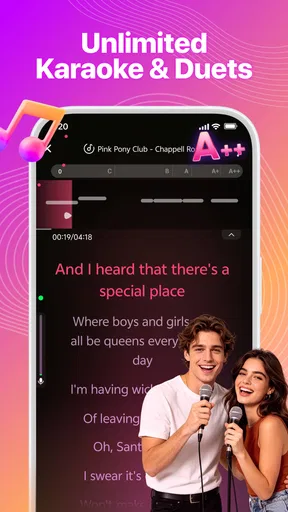
What impressed me was how user-friendly the app is. Navigating through the song selection and recording features is a breeze, even for those who aren't tech-savvy. The app also provides lyrics on-screen, making it easy to follow along without missing a beat.
And let's not forget the customization options. You can personalize your profile, add cool video effects to your performances, and even create playlists of your favorite songs. It’s all about making your karaoke experience uniquely yours.
Room for Improvement?
While StarMaker is a blast, no app is without its quirks. Occasionally, I experienced some lag during recording, which can be a bit of a buzzkill when you're in the zone. Also, some features are locked behind a subscription paywall, which might not be ideal for everyone.
Despite these minor hiccups, the app remains a fantastic tool for anyone looking to unleash their inner diva or rock star.
In conclusion, if you love singing and want a platform to express your musical talents, StarMaker: Sing Karaoke Songs is a must-try. It’s fun, engaging, and a great way to connect with fellow music enthusiasts worldwide. So grab your mic, pick your favorite song, and let your voice shine! 🎤
My recommendation after weighing the options
My recommendation is to try it if the social dimension is part of the fun for you. The strongest case is a singer who wants to move easily from choosing a song to making a take, adjusting the sound, and sharing it. The weaker case is someone who wants a strictly private tool or a detailed lesson plan; for those needs, a focused recorder or singing course is a better match.
I would give the first session a simple goal: find one song I genuinely enjoy and make one relaxed recording, without worrying about posting it. If following the lyrics and hearing the playback makes me want to try again, the app has already earned a place in my routine. If I only want background music or find the community distracting, I can stop there without feeling I need to use every feature.
My overall view is positive, with a clear caveat: the fun comes from participation, and the best results depend on realistic expectations about phone recording and effects. As a music and audio app, it makes karaoke feel immediate and social rather than formal. I would recommend it to casual singers who want a playful place to practice and share, while pointing more technically minded musicians toward tools built around deeper audio control.
Pros
- Wide song selection for all genres.
- Real-time duet feature with friends.
- User-friendly interface for easy navigation.
- High-quality audio recordings.
- Engaging community with social features.
Cons
- In-app purchases can be costly.
- Requires a stable internet connection.
- Ads can be intrusive at times.
- Limited free song options.
- Occasional app crashes reported.
FAQs for StarMaker: Sing Karaoke Songs
What features does StarMaker offer for karaoke enthusiasts?
StarMaker provides a variety of features for karaoke lovers. Users can select from millions of songs across various genres, record their performances, and apply audio effects to enhance their voice. Additionally, it offers options to collaborate with friends, participate in contests, and share recordings on social media, making it a comprehensive karaoke app.
Is StarMaker free to use, or does it require a subscription?
StarMaker is free to download and use, offering a wide selection of songs for free. However, it also provides a VIP subscription that unlocks premium features such as an ad-free experience, access to exclusive songs, and advanced audio effects. Users can choose to pay monthly or annually for this enhanced experience.
How does StarMaker enhance the social karaoke experience?
StarMaker enhances the social karaoke experience by allowing users to collaborate with friends or other users worldwide through duets and group songs. It also features a community where users can follow each other, like performances, and leave comments. This interactive platform fosters a vibrant social environment for karaoke enthusiasts.
What are the technical requirements for using StarMaker on mobile devices?
To use StarMaker effectively, users need a stable internet connection for downloading songs and uploading performances. The app is compatible with both Android and iOS devices, requiring Android 4.3 or higher and iOS 9.0 or later. Adequate storage space is also necessary for saving recordings and additional content.
Can users edit their recordings on StarMaker before sharing?
Yes, StarMaker allows users to edit their recordings before sharing. The app provides various audio effects, such as reverb and echo, to enhance vocal quality. Users can also adjust the pitch and tempo of their recordings. These editing tools ensure that users can achieve their desired sound before sharing performances with others.


